Amazing 👏 thanks so much UnderBrella for making this easy
CCTV Tradie
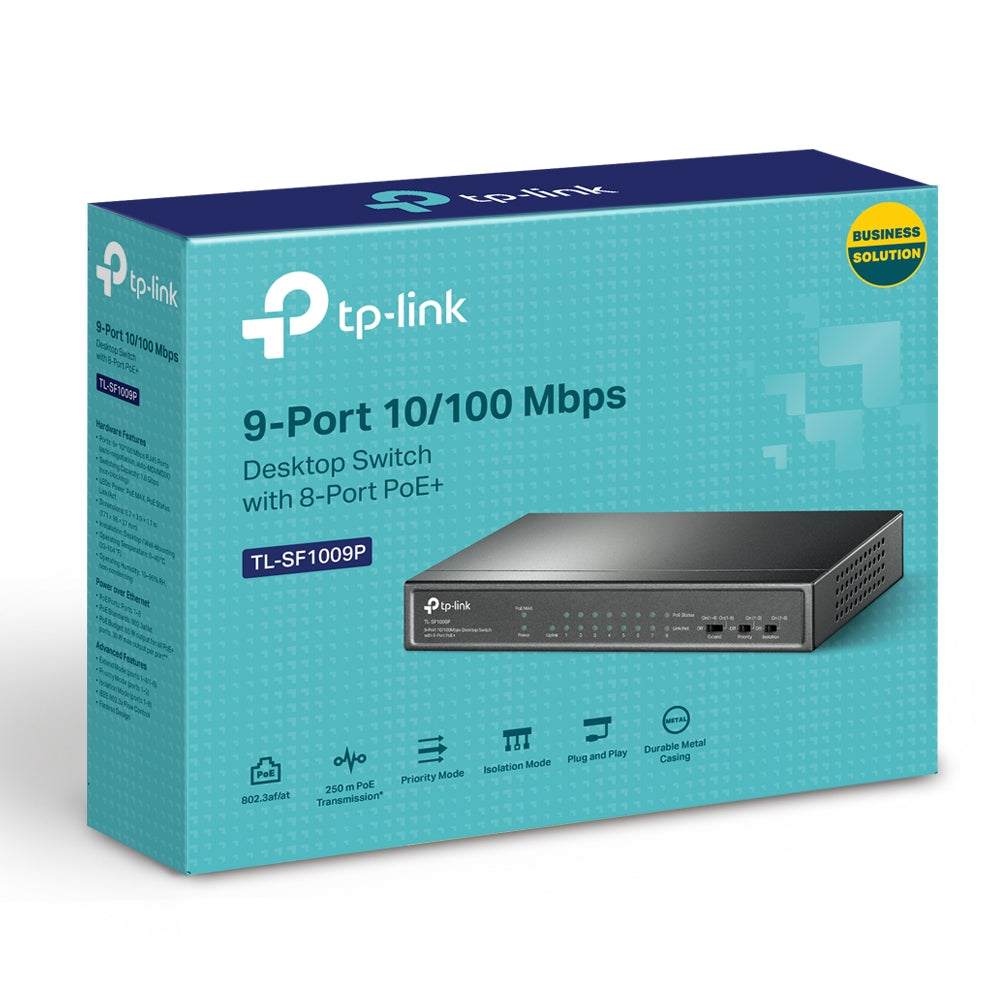
TP-Link TL-SF1009P 9-Port 10/100Mbps Desktop PoE+ Switch | Reliable Power & Data for Small Networks – EOL
TP-Link TL-SF1009P 9-Port 10/100Mbps Desktop PoE+ Switch | Reliable Power & Data for Small Networks – EOL
Regular price
$71.81 AUD
Regular price
$112.20 AUD
Sale price
$71.81 AUD
Duties and taxes included.
Shipping calculated at checkout.
Quantity
Couldn't load pickup availability
End of Life Product Notice: The TP-Link TL-SF1009P has reached end-of-life (EOL) status. Limited stock may remain available for purchase while supplies last.
Boost the efficiency of your small business or surveillance network with the TP-Link TL-SF1009P, a compact yet powerful 9-Port 10/100Mbps Desktop Switch featuring 8 PoE+ ports for simplified power and data connectivity.
Designed for plug-and-play operation, the TL-SF1009P is perfect for deploying IP cameras, wireless access points, VoIP phones, and other PoE devices without additional power cabling, reducing installation complexity and cost.
Each PoE+ port supports up to 30 W, while the switch delivers a total PoE budget of 65 W, enabling simultaneous power delivery for multiple devices.
Advanced features like Extend Mode allow PoE transmission up to 250 meters, ideal for larger installations or locations with distant devices. Priority Mode guarantees stable performance for critical applications like video monitoring, and Isolation Mode enables quick segmentation of network traffic to enhance security and reduce interference.
A fanless design ensures quiet operation and energy efficiency, making the TL-SF1009P perfect for offices, retail stores, or any space where silence is essential.
While this model has reached EOL, it remains a dependable solution for budget-conscious projects needing reliable PoE switching.
What's in the Box
-
TP-Link TL-SF1009P Switch
-
Power Adapter
-
Installation Guide
Main Features
✅ 8 PoE+ Ports with 65 W Budget – Power IP cameras, VoIP phones, and wireless APs without separate power adapters.
✅ Up to 30 W Per PoE Port – Handles high-power PoE devices with ease.
✅ 250 m Long-Range PoE Transmission – Extend Mode enables long-distance connections for cameras or remote devices.
✅ Priority Mode for Critical Devices – Ensures reliable bandwidth for important applications like video monitoring.
✅ Traffic Isolation with One Click – Isolation Mode improves security and prevents broadcast storms.
✅ Silent Fanless Design – Ideal for quiet environments and reduced power consumption.
✅ Plug-and-Play Simplicity – No complex configuration required.
Detailed Specifications
Interfaces:
-
9 × 10/100 Mbps RJ45 Ports
-
8 × 802.3af/at PoE+ Ports
-
Auto Negotiation / Auto MDI/MDIX
PoE Ports:
-
IEEE 802.3af/at compliant
-
Ports 1–8 support PoE+
-
Max power per port: 30 W
-
Total PoE budget: 65 W
Performance:
-
Switching Capacity: 1.8 Gbps
-
Packet Forwarding Rate: 1.3392 Mpps
-
MAC Address Table: 2K entries
-
Jumbo Frame: 2 KB
Advanced Features:
-
Extend Mode (up to 250 m PoE distance)
-
Priority Mode (Ports 1-2)
-
Isolation Mode (Ports 1-8)
-
PoE Auto Recovery (Ports 1-8)
-
IEEE802.3x Flow Control
-
Mac Address Auto-Learning and Auto-Aging
Transmission Method: Store-and-Forward
Physical:
-
Dimensions: 171 × 98 × 27 mm (6.7 × 3.9 × 1.1 in)
-
Fan Quantity: Fanless
-
Physical Security Lock: Yes
Power:
-
External Power Adapter: 53.5 VDC / 1.3 A
-
Max Power Consumption:
-
3.6 W (no PD connected)
-
77.1 W (with 65 W PD connected)
-
-
Max Heat Dissipation:
-
12.3 BTU/h (no PD connected)
-
262.8 BTU/h (with 65 W PD connected)
-
Certifications: FCC, CE, RoHS
Environment:
-
Operating Temperature: 0–40 °C (32–104 °F)
-
Storage Temperature: -40–70 °C (-40–158 °F)
-
Operating Humidity: 10–90% RH non-condensing
-
Storage Humidity: 5–90% RH non-condensing
Warranty Information
As an End-of-Life product, warranty and support for the TP-Link TL-SF1009P may be limited or vary depending on your region and seller. Contact your TP-Link distributor for details on available support and warranty coverage for EOL items.
Brand Description
TP-Link is a globally trusted networking brand known for innovative and affordable networking solutions that empower homes and businesses worldwide.
SKU
TL-SF1009P
Practical Use Scenarios
-
Small Office Networks – Perfect for connecting IP phones and cameras with minimal cabling.
-
Retail and Hospitality – Power security cameras and Wi-Fi access points across store floors.
-
Budget Surveillance Projects – Extend Mode allows deploying cameras further away from the network core.
-
Quiet Workspaces – Fanless operation ensures a silent environment for offices, studios, and clinics.
-
Temporary Installations – Plug-and-play convenience makes it easy to deploy and remove as needed.
Datasheets / Downloadable Resources
Download TP-Link TL-SF1009P Datasheet
Excellence for the Australian and New Zealand Market
The TP-Link TL-SF1009P meets Australian and New Zealand compliance standards (CE, FCC, RoHS) and was previously sourced via authorised TP-Link distributors. Though EOL, genuine units remain covered by local warranty and support where available, ensuring peace of mind for customers in the Australian and New Zealand markets.
FAQs
Q1. What is the total PoE power budget of the TL-SF1009P? (TL-SF1009P)
The TL-SF1009P provides a total PoE power budget of 65 W across its 8 PoE+ ports.
Q2. Can the TL-SF1009P support long-distance PoE connections? (TL-SF1009P)
Yes, using Extend Mode, the TL-SF1009P can deliver power and data up to 250 metres, ideal for surveillance installations.
Q3. Is the TL-SF1009P noisy? (TL-SF1009P)
No, the TL-SF1009P uses a fanless design, ensuring silent operation suitable for quiet environments.
Q4. Does the TL-SF1009P require configuration to work? (TL-SF1009P)
No configuration is required. The switch is plug-and-play for quick deployment.
Q5. Can the TL-SF1009P prioritise traffic for critical devices? (TL-SF1009P)
Yes! Priority Mode ensures that critical devices connected to ports 1–2 receive bandwidth priority for smooth operation.