Amazing 👏 thanks so much UnderBrella for making this easy
1
/
of
8
CCTV Tradie
TP-Link OC300 Omada Hardware Controller – Centralized SDN Management for Up to 500 APs, Multi-Site Control, Cloud Access, USB Backup, Gigabit Ports | SKU: OC300
TP-Link OC300 Omada Hardware Controller – Centralized SDN Management for Up to 500 APs, Multi-Site Control, Cloud Access, USB Backup, Gigabit Ports | SKU: OC300
Regular price
$376.38 AUD
Regular price
$464.10 AUD
Sale price
$376.38 AUD
Duties and taxes included.
Shipping calculated at checkout.
Quantity
Couldn't load pickup availability
Empower your business network with professional-grade control and visibility using the TP-Link OC300 Omada Hardware Controller. Designed for medium to large-scale networks, the OC300 centralizes the management of your entire Omada SDN infrastructure, delivering seamless integration, powerful monitoring, and simplified maintenance.
Supporting up to 500 Omada access points, 100 Omada routers, and 100 Omada switches (or up to 5 certain DeltaStream GPON OLTs), the OC300 is perfect for environments such as hospitality venues, educational campuses, corporate offices, and retail chains seeking to manage complex networks with ease.
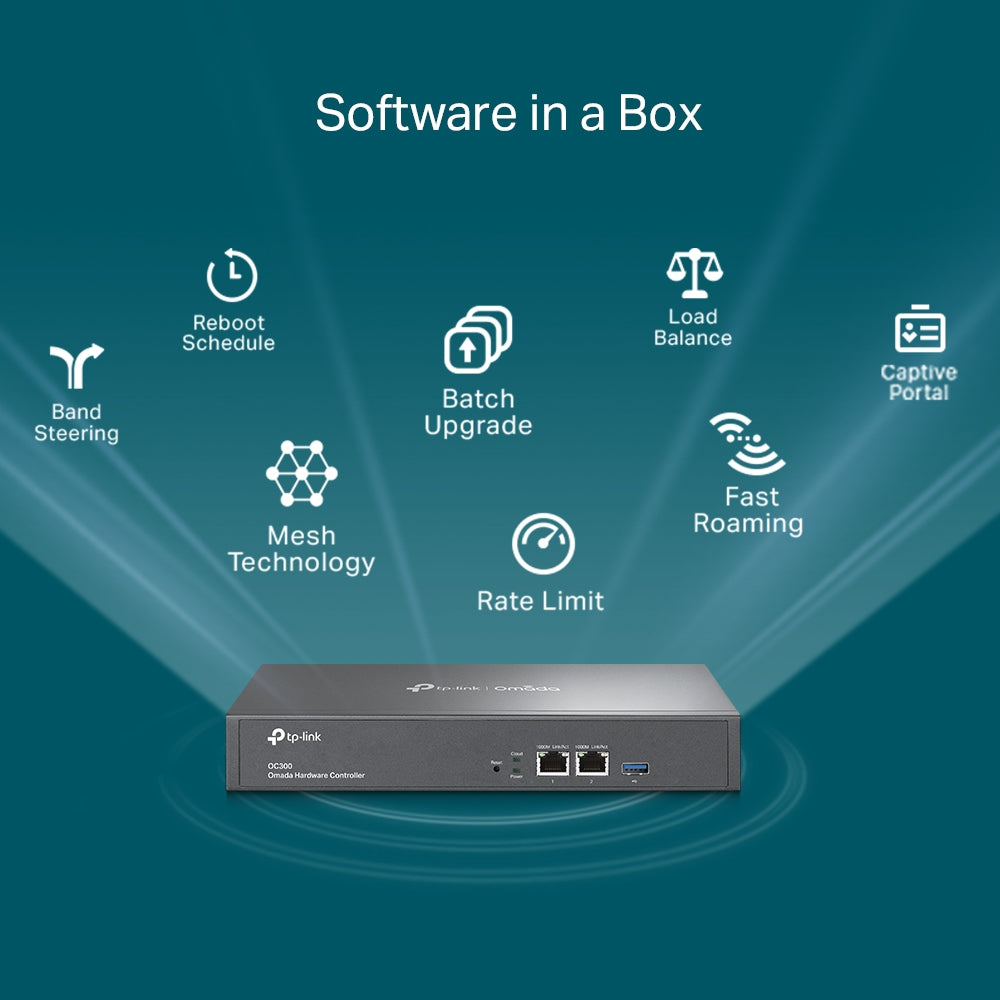
Featuring industry-leading hardware, including a powerful chipset and robust metal housing, the OC300 ensures reliable, high-performance operation. Two Gigabit Ethernet ports deliver fast connectivity, while a USB 3.0 port allows automatic configuration backups, safeguarding critical network data and settings.
Whether deployed on-premises or accessed remotely via the Omada app or web interface, the OC300 simplifies IT workflows with an intuitive dashboard, real-time network topology, and intelligent monitoring. Administrators can quickly identify and troubleshoot issues, optimize performance, and deploy updates across multiple sites with batch configurations and firmware upgrades.
Equipped with advanced security and administrative tools—including captive portal configuration, unified network policies, and L3 management—the OC300 empowers organizations to build secure, scalable, and efficient networks tailored to evolving business needs.
For enterprises aiming for exceptional network control without compromising on simplicity, the TP-Link OC300 Omada Hardware Controller delivers the perfect balance of performance, scalability, and value.
What’s Included in the Box
-
TP-Link Omada Hardware Controller OC300
-
Quick Installation Guide
-
Ethernet Cable
-
Power Cord
-
Rackmount Kit
Main Features
-
Centralized Network Management: Controls up to 500 Omada APs, 100 Omada routers, and 100 Omada switches (or 5 DeltaStream GPON OLTs) for scalable network operations.
-
High-Performance Hardware: Features a robust chipset, durable metal casing, and reliable operation for enterprise environments.
-
Free Cloud Access: Manage your network anytime, anywhere via the Omada app or web-based interface.
-
Easy On-Premises Control: Provides secure local management for high-security networks.
-
Real-Time Network Topology: Visualizes device connections for rapid troubleshooting and insights.
-
Batch Management Tools: Supports automatic device discovery, bulk configuration, and firmware upgrades to simplify administration.
-
USB 3.0 Backup: Enables automatic backup of settings for peace of mind and disaster recovery.
-
Intelligent Monitoring: Includes Wi-Fi heatmaps, network reports, and traffic distribution analytics.
-
Multi-Site & Multi-Tenant Management: Ideal for businesses operating across multiple branches or serving diverse customer networks.
Detailed Specifications
| Category | Details |
|---|---|
| Interfaces | 2× 10/100/1000 Mbps Ethernet Ports 1× USB 3.0 Port |
| Power Supply | 100–240 V ~ 50/60 Hz, 0.6 A |
| Max Device Management | Up to 500 Omada Access Points Up to 100 Omada Routers Up to 100 Omada Switches Up to 5 DeltaStream GPON OLTs |
| Management Features | Omada App Support Cloud Access L3 Management Multi-Site Management Batch Configuration Firmware Upgrades Unified Configuration Captive Portal Configuration Intelligent Monitoring Abnormal Event Alerts Automatic Device Discovery Reboot Scheduling |
| Monitoring Tools | Custom Dashboard Real-Time Network Topology Device and Client Lists Performance and Traffic Insights Wi-Fi Heatmap Simulator Network Reports |
| Operating Temperature | 0–50°C (32–122°F) |
| Storage Temperature | -40–70°C (-40–158°F) |
| Operating Humidity | 10%–90% RH, non-condensing |
| Storage Humidity | 5%–90% RH, non-condensing |
| Dimensions | 294 × 180 × 44 mm (11.6 × 7.1 × 1.7 in) |
| Certifications | CE, FCC, RoHS |
Warranty Information
TP-Link offers a limited warranty covering manufacturing defects and ensuring reliable support for enterprise customers. Customers in Australia and New Zealand benefit from dedicated local support via authorized partners for prompt assistance and warranty service.
Brand Description
TP-Link is a global leader in networking solutions, known for delivering innovative, secure, and scalable products for businesses and consumers alike. From small office networks to enterprise-grade infrastructures, TP-Link’s Omada SDN offers seamless integration, powerful management, and superior performance.
SKU
OC300
Practical Use Scenarios
✅ Ideal for hotels or resorts managing hundreds of APs and guest networks.
✅ Perfect for multi-site retail chains seeking centralized control and easy remote management.
✅ Excellent for schools and campuses needing secure and scalable network infrastructure.
✅ Suitable for MSPs (Managed Service Providers) delivering cloud-managed services to clients.
Datasheets & Downloadable Resources
Excellence for the Australian and New Zealand Market
The TP-Link OC300 meets stringent Australian and New Zealand compliance standards, ensuring safe and reliable operation in diverse business environments. All devices sold in ANZ are sourced through official channels for regulatory compliance, genuine hardware, and full local warranty support. Businesses across Australia and New Zealand can trust the OC300 to deliver professional-grade network management and seamless performance.
FAQs
Q1: How many devices can the TP-Link OC300 (SKU: OC300) manage?
A1: The OC300 can manage up to 500 Omada access points, 100 routers, and up to 100 switches, or up to 5 certain DeltaStream GPON OLTs.
Q2: Does the TP-Link OC300 (SKU: OC300) support cloud management?
A2: Yes! The OC300 offers free cloud access through the Omada app or web interface for remote monitoring and management.
Q3: What ports are available on the TP-Link OC300 (SKU: OC300)?
A3: The OC300 features 2× Gigabit Ethernet ports and 1× USB 3.0 port for flexible connectivity and easy backups.
Q4: Can the TP-Link OC300 (SKU: OC300) handle multi-site networks?
A4: Absolutely! It supports multi-site and multi-tenant management, making it ideal for distributed businesses and MSPs.
Q5: Does the TP-Link OC300 (SKU: OC300) support automatic backups?
A5: Yes, the USB 3.0 port allows automatic configuration backups to protect your network settings.
Share
See what people think about UnderBrella